
The Zero Trust Security on AWS: Trust Nobody, Verify Everything
Let’s be real: the castle-and-moat model of security had a good run, but it’s been running on fumes for years. VPNs, static firewall rules, and a cozy feeling that “everything inside the network is fine”—that playbook does not survive contact with modern cloud architectures, remote workforces, and threat actors who have read your runbooks better than your on-call team has.
Zero Trust flips the script. Instead of assuming anything inside your perimeter is trustworthy, you assume nothing is. Every request, every identity, every packet gets verified. Not once—continuously. It’s not a product you buy. It’s a design philosophy you adopt. And AWS gives you a seriously stacked toolkit to make it happen.
The Core Principles of Zero Trust (a.k.a. The Vibe Check)
Before we geek out on AWS services, here’s the mental model. Zero Trust boils down to a few non-negotiable ideas:
- Verify explicitly. Authenticate and authorize every single request using all available data—identity, location, device health, the works.
- Use least-privilege access. Give people and services the minimum permissions they need to do their job and nothing more. Overprivileged IAM roles are the unpatched CVE of the cloud world.
- Assume breach. Design your systems as if an attacker is already inside. Segment networks, encrypt everything in transit and at rest, and monitor like your SLA depends on it—because it does.
- Never trust, always verify. This isn’t just the tagline. It means continuous validation, not one-and-done auth at the front door.
With those ideas in your back pocket, let’s walk through how AWS services map to each principle.
Identity: IAM Is Your First Line of Everything in Zero Trust
AWS Identity and Access Management (IAM) is where Zero Trust begins—and honestly, where most teams still have the most room to improve. If your AWS account has an IAM user with AdministratorAccess and static long-lived credentials sitting in a CI pipeline somewhere, we need to have a conversation.
Here’s the Zero Trust approach to IAM:
- Ditch long-lived access keys. Use IAM Roles and short-lived credentials from AWS Security Token Service (STS) everywhere you can. If a human needs console access, route them through AWS IAM Identity Center (formerly SSO) with MFA enforced.
- Scope policies down to the resource level. Instead of Allow s3:* on *, write policies that specify exact buckets, prefixes, and actions. AWS IAM Access Analyzer can help you identify overly permissive policies you already have in production.
- Use Service Control Policies (SCPs) at the org level. Even if an individual account’s IAM policy is wide open, SCPs in AWS Organizations act as guardrails. They’re the seatbelt for your seatbelt.
- Enable IAM Access Analyzer continuously. It flags resources shared outside your AWS Organization—public S3 buckets, open Lambda permissions, cross-account role assumptions you forgot about.
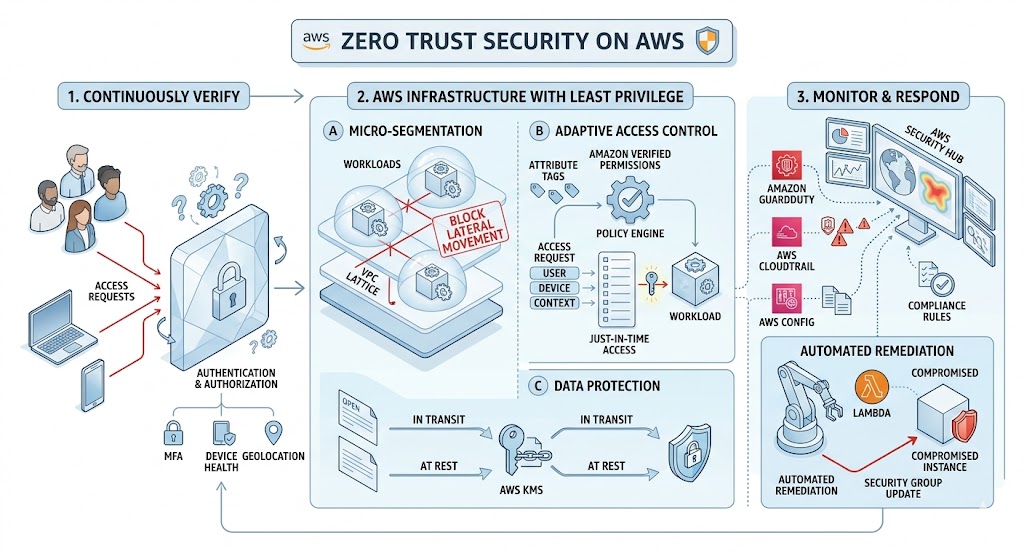
Network: Micro-Segmentation, Not a Flat Playground
In a Zero Trust world, your network is not one big happy subnet. You segment aggressively, and every hop between services has to justify its existence.
- VPC design matters. Use private subnets by default. Public subnets should be the exception, not the rule. Put your ALBs and NAT Gateways in public subnets; put everything else behind them.
- Security Groups as micro-firewalls. Security Groups in AWS are stateful and can reference other Security Groups by ID, which means you can build rules like “only allow traffic from the app tier SG on port 8080.” That’s micro-segmentation without needing a third-party overlay network.
- AWS PrivateLink for service-to-service communication. Instead of routing traffic over the public internet (or even through a NAT Gateway), PrivateLink lets you access AWS services and your own VPC endpoint services over the AWS backbone. No internet exposure. No public IPs. Clean.
- VPC Flow Logs for visibility. You cannot secure what you cannot observe. Turn on VPC Flow Logs and ship them to CloudWatch or S3 for analysis. Tools like Amazon Athena can query them at scale if you need to investigate something at 2 AM.
Data Protection: Encrypt Everything, Argue About Nothing
Zero Trust means treating data as potentially compromised at every stage. Encryption is not optional—it’s the baseline.
- AWS Key Management Service (KMS) for key management. Use customer-managed keys (CMKs) so you control rotation, access policies, and audit trails. KMS integrates natively with S3, EBS, RDS, DynamoDB, and just about every AWS service that stores data.
- Enforce encryption in transit with TLS everywhere. Use AWS Certificate Manager (ACM) to provision and auto-renew TLS certificates. Terminate TLS at your ALB or CloudFront distribution, and then re-encrypt to your backends. No cleartext hops.
- S3 bucket policies that enforce encryption. Use aws:SecureTransport condition keys to deny any request that isn’t over HTTPS. Combine this with default SSE-KMS encryption on the bucket so data is encrypted at rest without relying on developers to remember.
- AWS Secrets Manager for credentials. Hardcoded secrets in environment variables are a Zero Trust anti-pattern. Secrets Manager handles rotation, access control, and audit logging.
Monitoring: Assume Breach, Detect Early. Zero Trust.
Here’s the uncomfortable truth: prevention is necessary but insufficient. Zero Trust assumes that at some point, something will get through. Your job is to detect it fast and limit the blast radius.
- AWS CloudTrail is non-negotiable. Every API call in your AWS account gets logged. Enable it in every region, send it to a centralized S3 bucket with object lock, and set up CloudWatch alarms for high-severity events like root account usage or IAM policy changes.
- Amazon GuardDuty for threat detection. GuardDuty analyzes CloudTrail logs, VPC Flow Logs, and DNS logs using machine learning to identify suspicious activity—things like credential exfiltration, crypto-mining instances, or unusual API calls from unfamiliar geolocations.
- AWS Security Hub as your single pane of glass. It aggregates findings from GuardDuty, IAM Access Analyzer, Inspector, Macie, and third-party tools into one dashboard. If you’re not using Security Hub, you’re checking six different consoles and missing things.
- Amazon Detective for investigation. When GuardDuty raises a finding, Detective helps you dig into it. It builds behavior graphs from your log data so you can trace an incident back to its root cause without writing a dozen Athena queries by hand.
Workload Security: Trust No Container, Trust No Lambda
Zero Trust isn’t just about the network and identity layers. Your workloads—containers, serverless functions, EC2 instances—also need to prove they’re behaving.
- Amazon Inspector for vulnerability scanning. Inspector continuously scans your EC2 instances, Lambda functions, and ECR container images for software vulnerabilities and unintended network exposure. It’s automated, so no one has to remember to kick off a scan.
- AWS Verified Access for application-level Zero Trust. This is a big one. Verified Access lets you provide secure access to your applications without a VPN. It evaluates each request against policies that can factor in identity, device posture, and other context—exactly what Zero Trust calls for.
- IMDSv2 on all EC2 instances. The Instance Metadata Service v1 is an SSRF attacker’s best friend. IMDSv2 requires a session token, which makes those credential-theft attacks significantly harder. Enforce it with a launch template or an SCP that denies RunInstances without IMDSv2.
- Task-level IAM roles in ECS and EKS. Don’t give your entire cluster one giant IAM role. Assign roles at the task (ECS) or pod (EKS via IRSA or EKS Pod Identity) level. Each microservice gets exactly the permissions it needs.
Practical Moves You Can Make This Week
Zero Trust can feel overwhelming if you try to boil the ocean. Don’t. Here are five concrete things you can do in the next few days that will materially improve your posture:
- Run IAM Access Analyzer across your accounts. Fix every finding that flags an unintended external share. This is usually a one-afternoon project with outsized impact.
- Enable GuardDuty in every region. It takes about 30 seconds per region in the console (or one Terraform resource). There is no good reason not to have it on.
- Audit your Security Groups. Look for rules that allow 0.0.0.0/0 on anything other than ports 80 and 443 on your load balancers. Tighten everything else to specific CIDR ranges or SG references.
- Rotate or eliminate long-lived IAM access keys. Use aws iam generate-credential-report to find them. Replace with IAM roles and STS wherever possible.
- Turn on default encryption for S3 buckets and EBS volumes. It’s a few clicks or a single API call per resource, and it eliminates an entire class of data-at-rest exposure.
The Bottom Line
Zero Trust on AWS is not a product SKU. You can’t buy it in the Marketplace. It’s a set of principles applied consistently across identity, network, data, and workload layers—and AWS provides native services at every layer to help you get there.
The shift isn’t easy, and it’s definitely not a weekend project. But every step you take—scoping an IAM policy tighter, flipping a Security Group from wide-open to purpose-built, encrypting a data store—moves you closer to an architecture where a single compromised credential doesn’t mean game over.
Trust nobody. Verify everything. Ship it.
#enkompass #aws #zerotrust
Home
Disclaimer: AWS service capabilities and pricing change frequently. Always consult the official AWS documentation for the most current information. This post reflects publicly available information as of April 2026.